
RoboCar Checkpoint 02 - Version 1
Current Checkpoint:
- Upload macro-level hardware plans here with requirements.
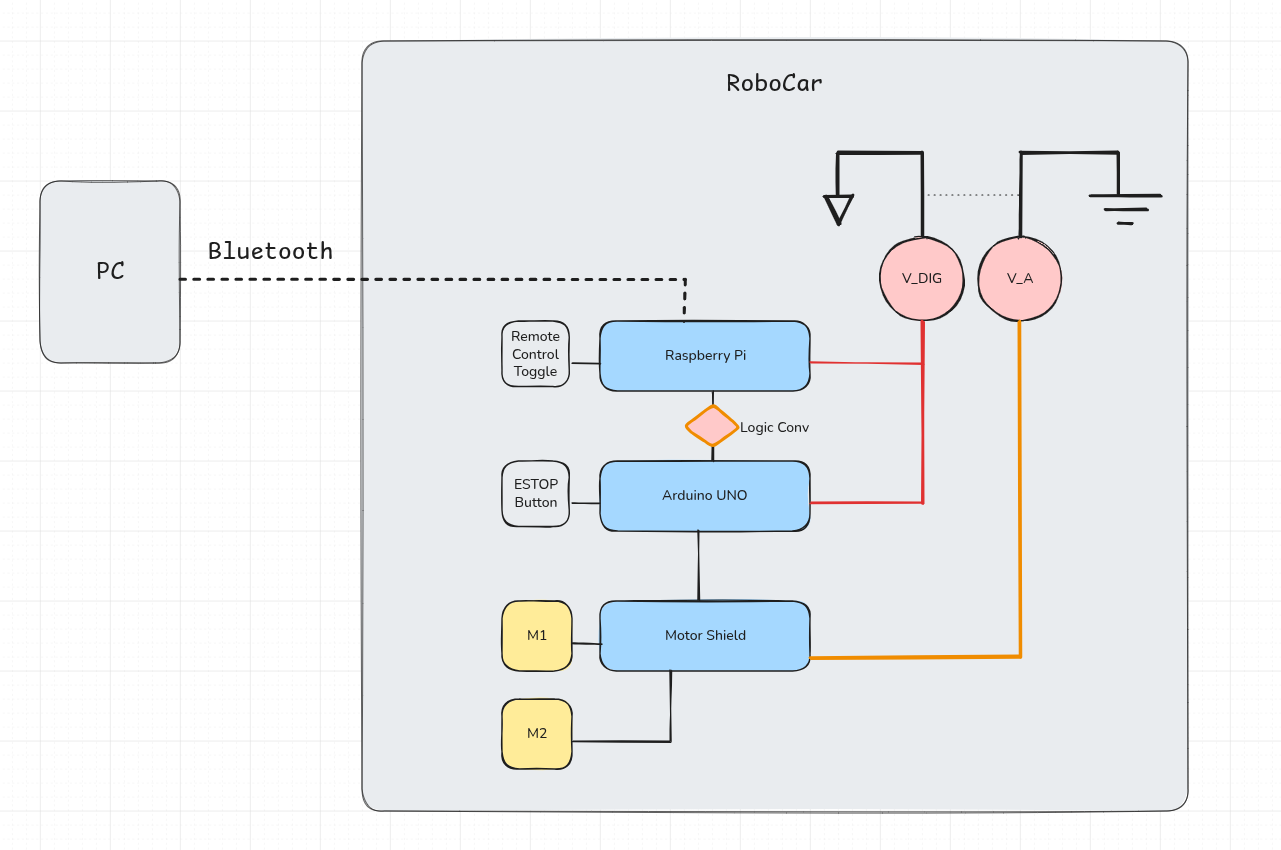 Figure 1
V1.0 Requirements :
- RoboCar shall be be able to move forward, backward, left, and right. Tank controls are acceptable.
- RoboCar shall achieve a forward speed of ??
- RoboCar shall be able to accept (movement) commands from a remote PC with (???) allowable loss.
- RoboCar shall not be wired such that power or communication cables are tethering the vehicle.
- RoboCar shall come to a complete stop in (?? ms) when the ESTOP is pressed.
- RoboCar shall be be able to move forward, backward, left, and right. Tank controls are acceptable.
- ROS : turtle tut
Using the tutorial but trying turtlesim in a terminal using ‘ros2 run turtlesim turtlesimnode‘ results in
qt.qpa.xcb: qt.qpa.plugin: Could not load the Qt platform plugin "xcb" in "" even though it was found.
This application failed to start because no Qt platform plugin could be initialized. Reinstalling the application may fix this problem.
Available platform plugins are: eglfs, linuxfb, minimal, minimalegl, offscreen, vnc, wayland-egl, wayland, wayland-xcomposite-egl, wayland-xcomposite-glx, xcb.
solving this required a few more libraries and ensuring xauth is on my laptop! The libraries (X/Qt/xcb…) I had to install on the pi were "sudo apt install"…
- x11-apps
- libgl1
- libgl1-mesa-dri
- libgl1-mesa-glx
- libegl1-mesa
- libegl-mesa0
- libxcb1
- libx11-xcb1
- libxcb-xinerama0
- libxcb-icccm4
- libxcb-image0
- libxcb-keysyms1
- libxcb-randr0
- libxcb-render-util0
- libxcb-shm0
- libxcb-xkb1
- libxkbcommon-x11-0
and running a checky little ssh session ‘xeyes‘ for a simple test. After that, turtlesim worked!!
- ROS : controller control turtles through ssh (can kicked)
- Ard : Outline how to flash firmware
- For the firmware flash, I wanted to move away from the
Arduino IDE and attempt to flash using a programmer and
make/shell pipeline. For this, I opted to use the
AVR Programmer which has a healthy amount of documentation
around the PCB and programming along with the ability to
power the uno.
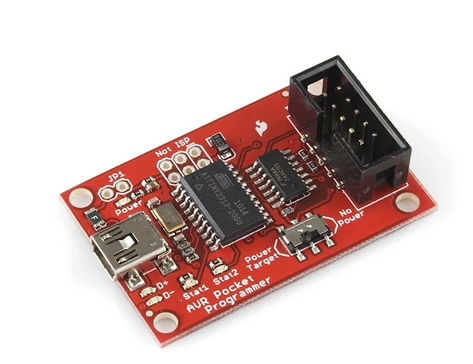 Figure 2
 - Since I had installed the arduino IDE in the past,
I had the
ard-gcccompiler and libs installed. All I had to do was follow the process of generating a hex file outlined in another page [TODO]. - With the pipeline made, I created a small blink LED
test with the dir structure
					|- bin
					|   |- blink.elf
					|   |- blink.hex
					|   |- blink.o
					|
					| - Makefile
					|
					| - run.sh
					|
					| - src
					|   | - blink.c
Be sure to look at my github for idea of the Makefile and shell BUT they should be a review from [TODO], the other file I posted today.
- For the firmware flash, I wanted to move away from the
Arduino IDE and attempt to flash using a programmer and
make/shell pipeline. For this, I opted to use the
AVR Programmer which has a healthy amount of documentation
around the PCB and programming along with the ability to
power the uno.
Next Checkpoints:
- (Arduino) Author a bare-bones, tank-style motor control system that accepts movement commands (hard-coded script til pi) using a TDD framework.
- (Pi) Switch ssh over to bluetooth from WLAN (and static address)